> For the complete documentation index, see [llms.txt](https://docs.cherry-ai.com/llms.txt). Markdown versions of documentation pages are available by appending `.md` to page URLs; this page is available as [Markdown](https://docs.cherry-ai.com/docs/zhong-wen-fan-ti/pre-basic/providers/ppio.md).
# PPIO 派歐雲
## Cherry Studio 接入 PPIO LLM API
### [](https://ppinfra.com/docs/third-party/cherry-studio-use#%E6%95%99%E7%A8%8B%E6%A6%82%E8%BF%B0)教程概覽
Cherry Studio 係一款多模型桌面客戶端,目前支援:Windows、Linux、MacOS 系統安裝包。佢整合主流 LLM 模型,提供多場景輔助。用戶可透過智能會話管理、開源定制、多主題介面嚟提升工作效率。
Cherry Studio 而家已經同 **PPIO 高性能 API 通道** 深度適配——透過企業級算力保障,實現 **DeepSeek-R1/V3 高速回應** 同 **99.9% 服務可用性**,帶畀你快速流暢嘅體驗。
下面教程包含完整接入方案(含密鑰配置),3 分鐘開啟「Cherry Studio 智能調度 + PPIO 高性能 API」嘅進階模式。
### [](https://ppinfra.com/docs/third-party/cherry-studio-use#1-%E8%BF%9B%E5%85%A5-cherrystudio%EF%BC%8C%E6%B7%BB%E5%8A%A0-%E2%80%9Cppio%E2%80%9D-%E4%BD%9C%E4%B8%BA%E6%A8%A1%E5%9E%8B%E6%8F%90%E4%BE%9B%E5%95%86)1. 進入 CherryStudio,新增「PPIO」做模型供應商
首先前往官網下載 Cherry Studio:[ ](https://cherryai.com.cn/download) (如果入唔到,可以打開下面嘅夸克網盤連結下載自己需要嘅版本:)
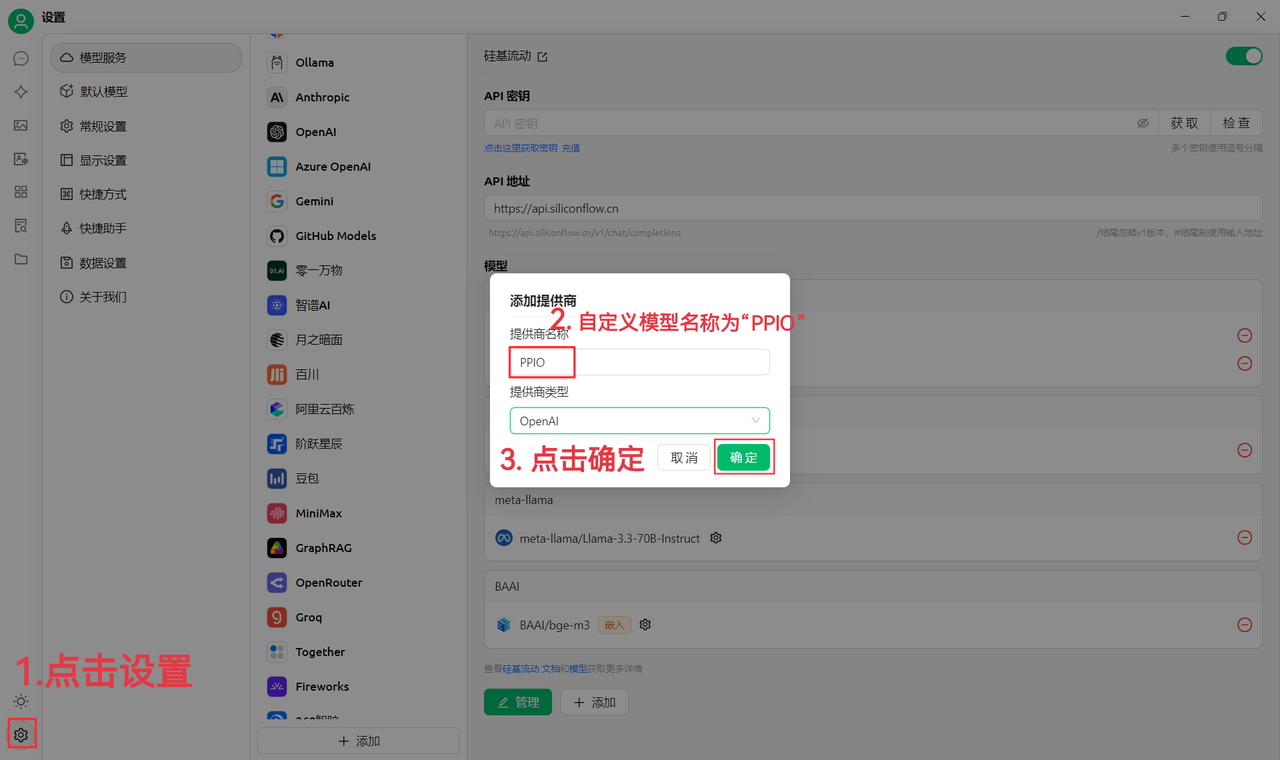
(1)先點擊左下角設定,自訂供應商名稱做:`PPIO`,點擊「確定」
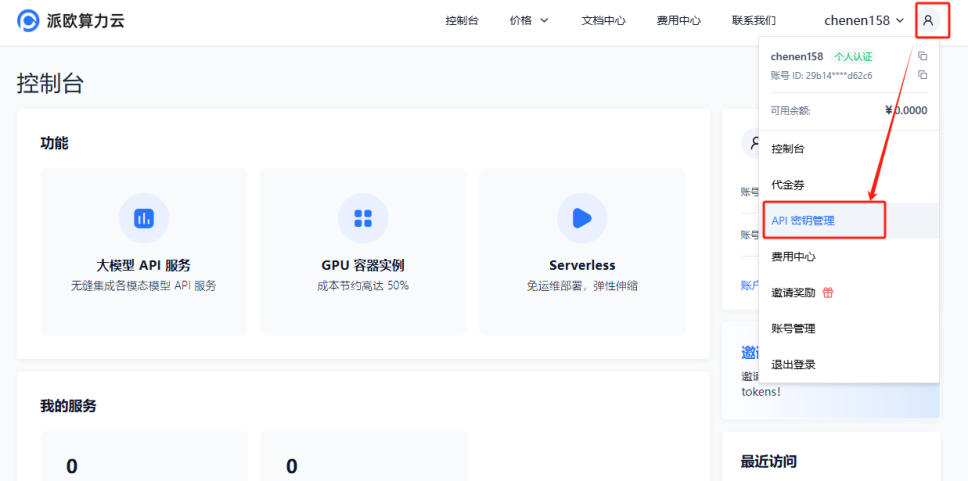
(2)前往 [派歐算力雲 API 密鑰管理 ](https://ppinfra.com/user/register?invited_by=JYT9GD\&utm_source=github_cherry-studio),點擊【用戶頭像】—【API 密鑰管理】進入控制台
點擊【+ 建立】按鈕嚟建立新嘅 API 密鑰。自訂一個密鑰名稱,**生成嘅密鑰只會喺生成時顯示,務必複製並保存到文件中,以免影響後續使用**
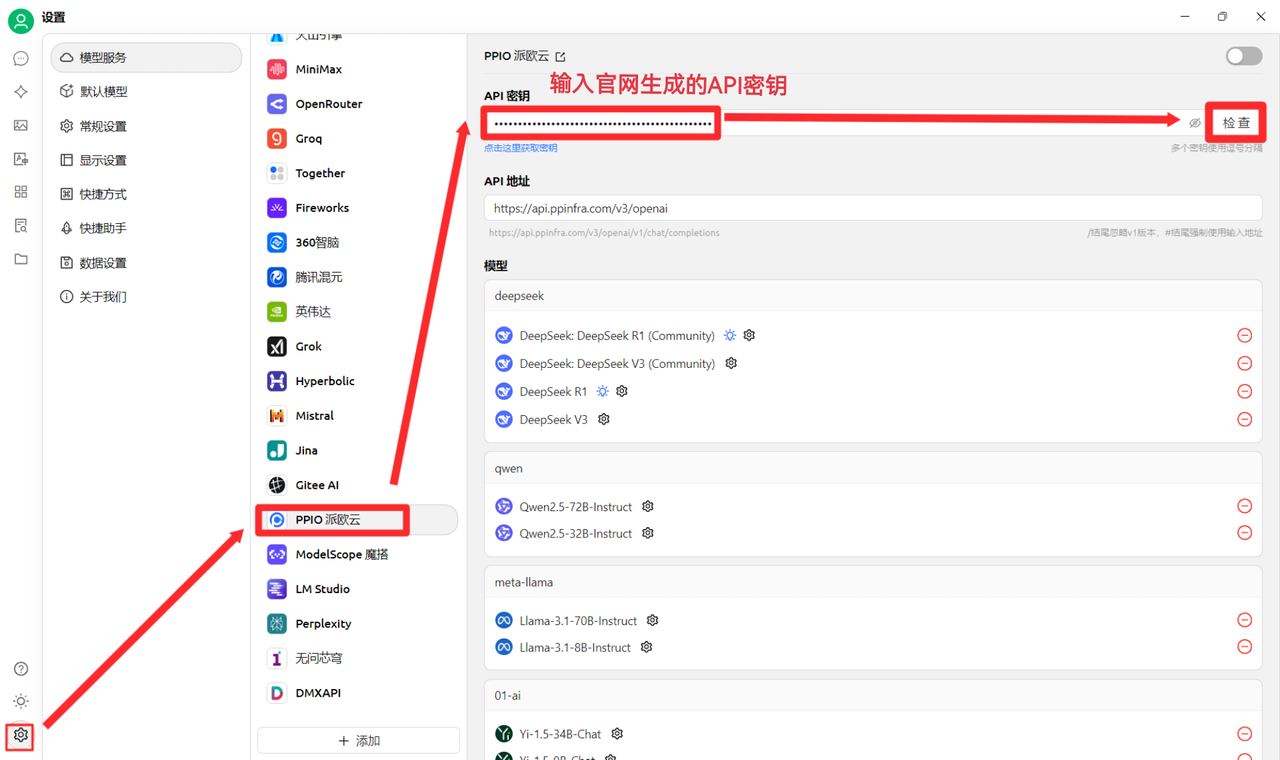
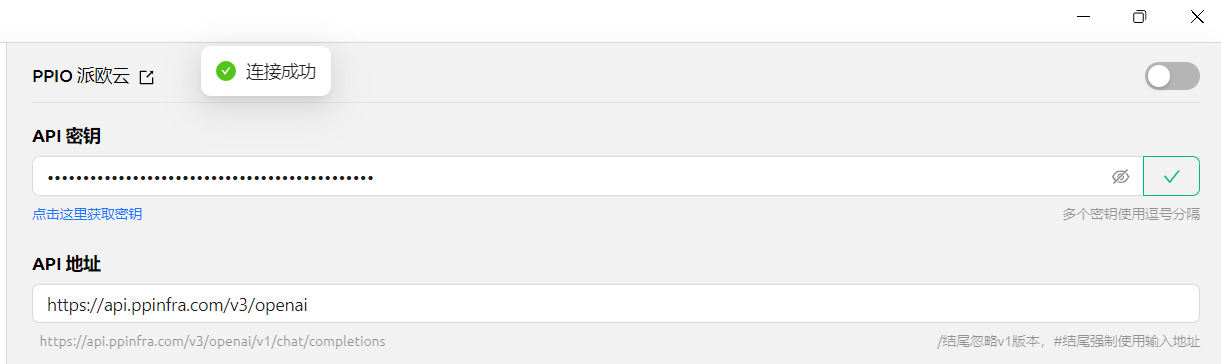
(3)喺 CherryStudio 輸入密鑰,點擊設定,選擇【PPIO 派歐雲】,輸入官網生成嘅 API 密鑰,最後點擊【檢查】
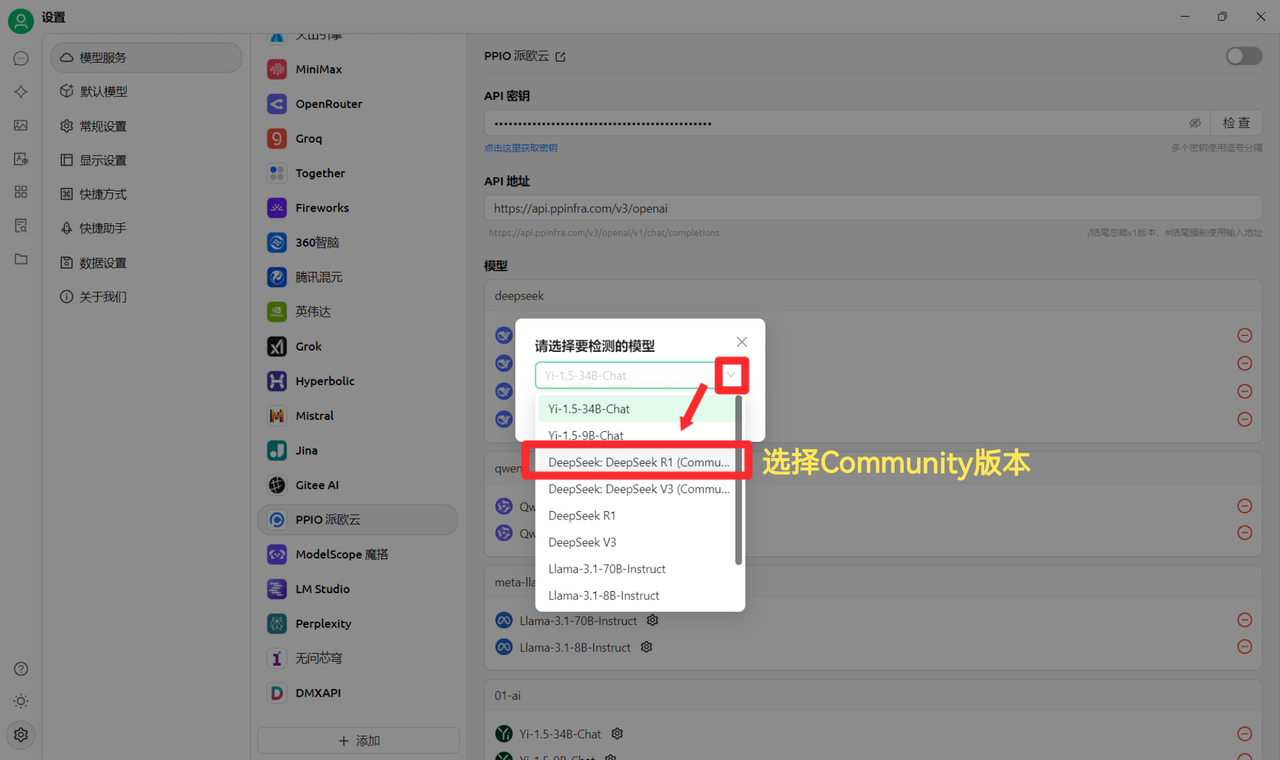
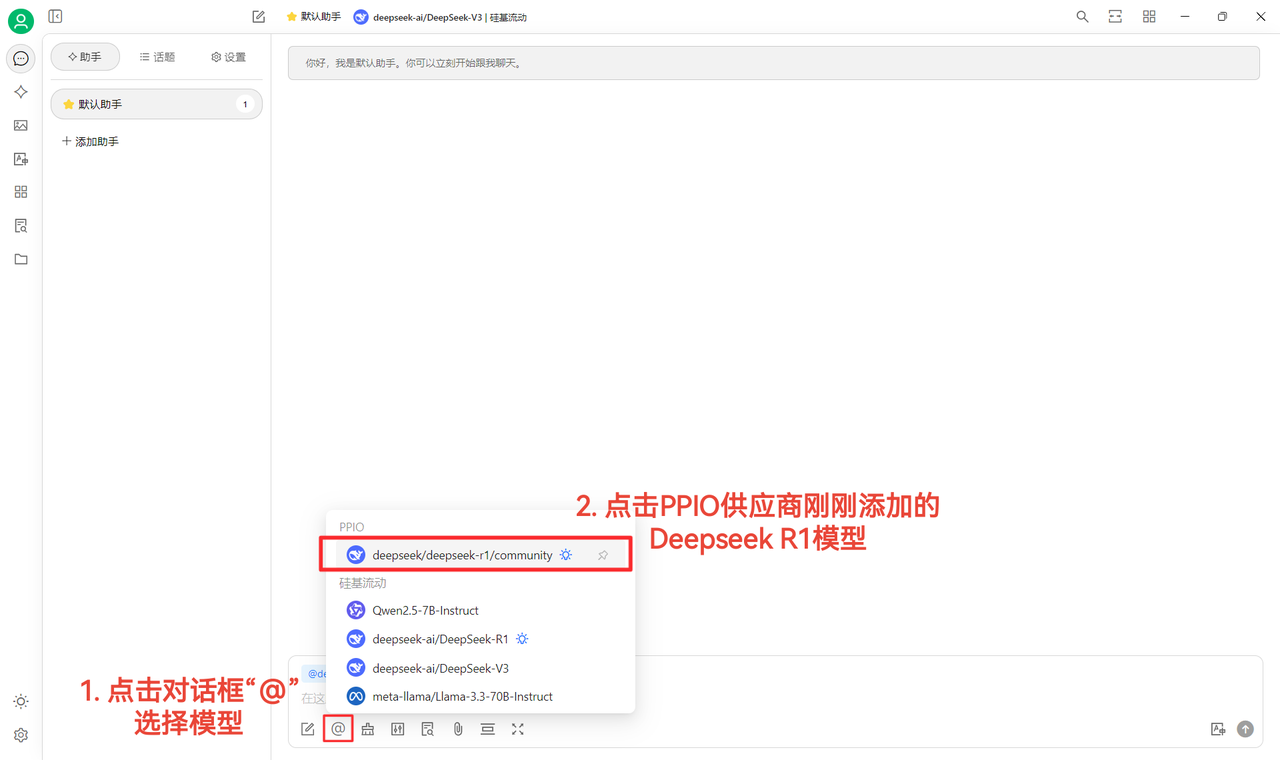
(4)選擇模型:以 deepseek/deepseek-r1/community 為例,如需更換其他模型,可直接更換。
DeepSeek R1 同 V3 community 版本只供大家試吓鮮,亦係全參數滿血版模型,穩定性同效果無差異,如需大量調用則須 **充值並切換到非 community 版本**。
### [](https://ppinfra.com/docs/third-party/cherry-studio-use#2-%E6%A8%A1%E5%9E%8B%E4%BD%BF%E7%94%A8%E9%85%8D%E7%BD%AE)2. 模型使用配置
(1)點擊【檢查】顯示連接成功後即可正常使用
(2)最後點擊【@】選擇 PPIO 供應商底下剛剛新增嘅 DeepSeek R1 模型,即可成功開始傾偈~
【部分素材來源:[ 陳恩 ](https://www.kdocs.cn/l/ctGiF5K6PQoO)】
### [](https://ppinfra.com/docs/third-party/cherry-studio-use#3-ppio%C3%97cherry-studio-%E8%A7%86%E9%A2%91%E4%BD%BF%E7%94%A8%E6%95%99%E7%A8%8B)3. PPIO×Cherry Studio 視頻使用教程
如果你更傾向直觀學習,我哋喺 B 站準備咗視頻教程。透過手把手教學,幫你快速掌握「PPIO API+Cherry Studio」嘅配置方法,點擊下面連結直達視頻,開啟流暢開發體驗 → [《【仲喺度為 DeepSeek 瘋狂轉圈抓狂?】派歐雲+DeepSeek 滿血版 =?唔再擠塞,即刻起飛》](https://www.bilibili.com/video/BV1BZNmeTEwg/?buvid=XX82F37818653072D274A6BB8A4FE7938A30C\&from_spmid=search.search-result.0.0\&is_story_h5=false\&mid=3CpKQv%2Bjnb8k6iTGlUl1eH8FTQ%2FSZMtL1rElX6M3iMo%3D\&plat_id=116\&share_from=ugc\&share_medium=android\&share_plat=android\&share_session_id=b892268f-5751-4f6e-9690-50b37855d346\&share_source=WEIXIN\&share_source=weixin\&share_tag=s_i\&spmid=united.player-video-detail.0.0\×tamp=1739160448\&unique_k=eKDZuRP\&up_id=3546757841554023\&vd_source=50fea165795ccc47455a165f5bcaeed2)
【視頻素材來源:sola】
***
### 💡 獲取幫助同提交反饋
如果你喺配置或者使用過程中遇到任何疑問、Bug 或者有功能改進建議,請參考 [反饋同建議](/docs/zhong-wen-fan-ti/question-contact/suggestions.md) 入面提供嘅官方渠道。
---
# Agent Instructions
This documentation is published with GitBook. GitBook is the documentation platform designed so that both humans and AI agents can read, navigate, and reason over technical content effectively. Learn more at gitbook.com.
## Querying This Documentation
If you need additional information that is not directly available in this page, you can query the documentation dynamically by asking a question.
Perform an HTTP GET request on the current page URL with the `ask` query parameter, and the optional `goal` query parameter:
```
GET https://docs.cherry-ai.com/docs/zhong-wen-fan-ti/pre-basic/providers/ppio.md?ask=&goal=
```
`ask` is the immediate question: it should be specific, self-contained, and written in natural language.
`goal` is optional and describes the broader end goal you are ultimately trying to accomplish on behalf of the user. GitBook uses it to tailor the answer towards what is most useful for that goal.
The response will contain a direct answer to the question and relevant excerpts and sources from the documentation.
Use this mechanism when the answer is not explicitly present in the current page, you need clarification or additional context, or you want to retrieve related documentation sections.