# PPIO 派欧云
## Cherry Studio 接入 PPIO LLM API
### [](https://ppinfra.com/docs/third-party/cherry-studio-use#%E6%95%99%E7%A8%8B%E6%A6%82%E8%BF%B0)教程概述
Cherry Studio 是一款多模型桌面客户端,目前支持:Windows 、Linux 、MacOS 系电脑安装包。它聚合主流 LLM 模型,提供多场景辅助。用户可通过智能会话管理、开源定制、多主题界面来提升工作效率。
Cherry Studio 现已与 **PPIO 高性能 API 通道** 深度适配——通过企业级算力保障,实现 **DeepSeek-R1/V3 高速响应** 与 **99.9% 服务可用性**,带给您快速流畅的体验。
下方教程包含完整接入方案(含密钥配置),3 分钟开启「Cherry Studio 智能调度 + PPIO 高性能 API」的进阶模式。
### [](https://ppinfra.com/docs/third-party/cherry-studio-use#1-%E8%BF%9B%E5%85%A5-cherrystudio%EF%BC%8C%E6%B7%BB%E5%8A%A0-%E2%80%9Cppio%E2%80%9D-%E4%BD%9C%E4%B8%BA%E6%A8%A1%E5%9E%8B%E6%8F%90%E4%BE%9B%E5%95%86)1. 进入 CherryStudio,添加 “PPIO” 作为模型提供商
首先前往官网下载 Cherry Studio:[ ](https://cherry-ai.com/download) (如果进不去可以打开下面的夸克网盘链接下载自己需要的版本:
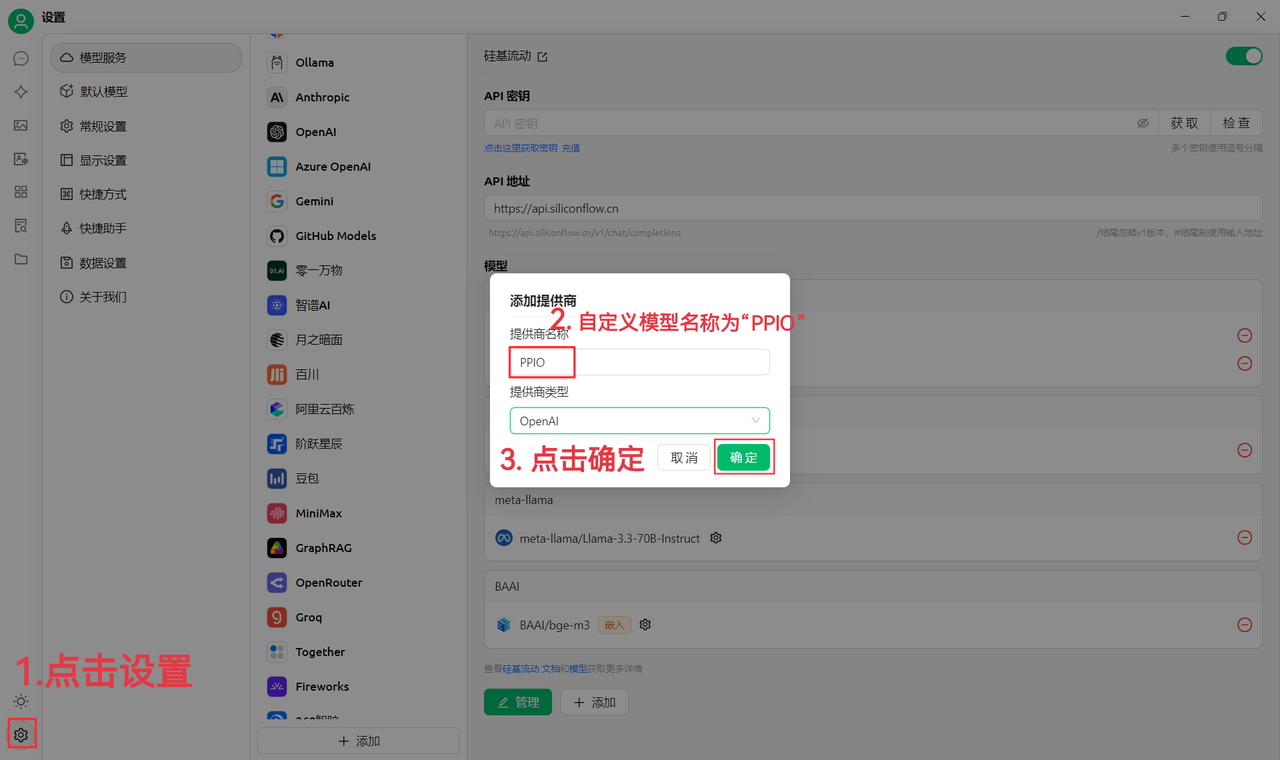
(1)先点击左下角设置,自定义提供商名称为:`PPIO`,点击“确定”
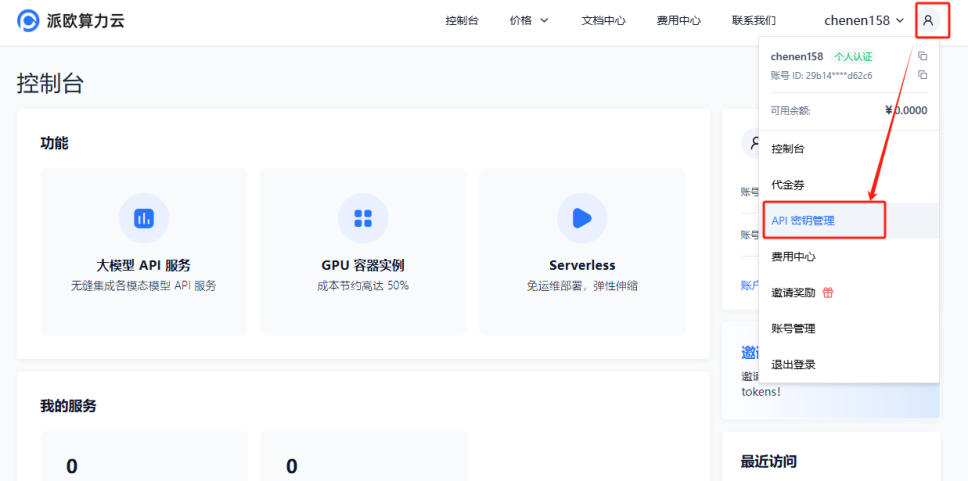
(2)前往 [派欧算力云 API 密钥管理 ](https://ppinfra.com/user/register?invited_by=JYT9GD\&utm_source=github_cherry-studio),点击【用户头像】—【API 密钥管理】进入控制台
点击 【+ 创建】按钮来创建新的 API 密钥。自定义一个密钥名称,**生成的密钥仅在生成时呈现,务必复制并保存到文档中,以免影响后续使用**
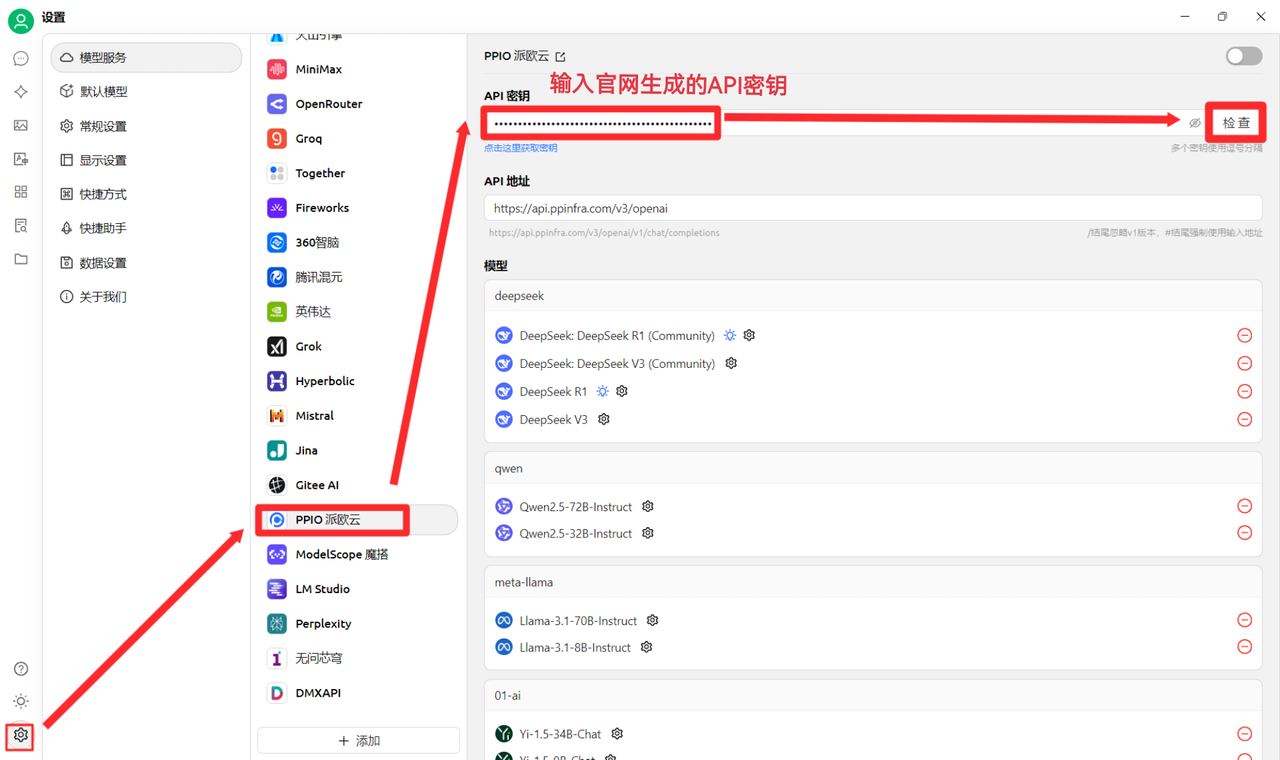
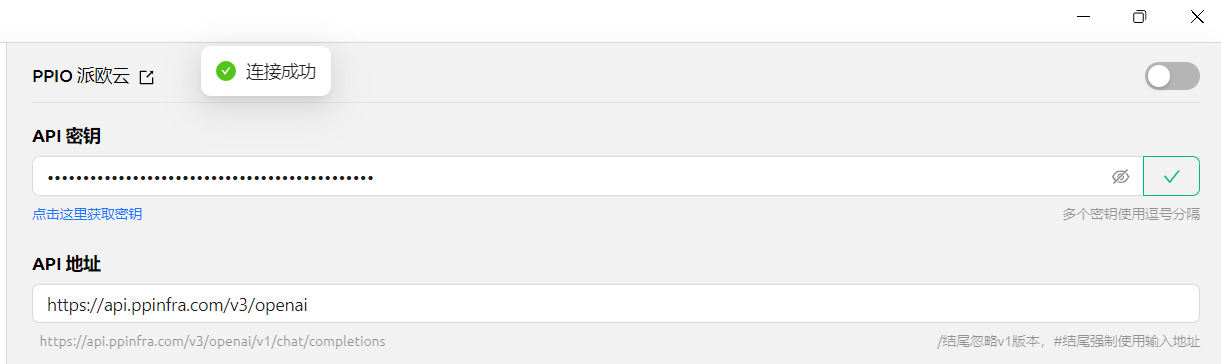
(3)在 CherryStudio 填入密钥 点击设置,选择【PPIO 派欧云】,输入官网生成的 API 密钥,最后点击【检查】
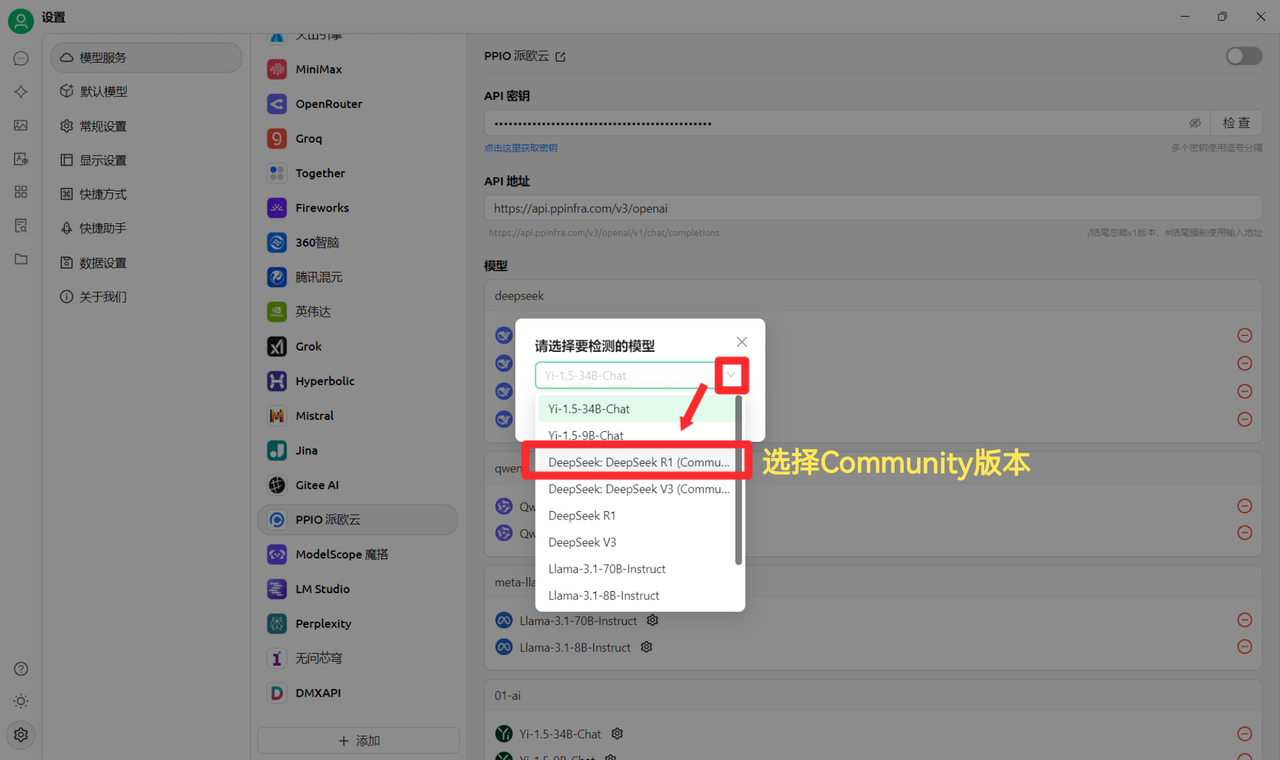
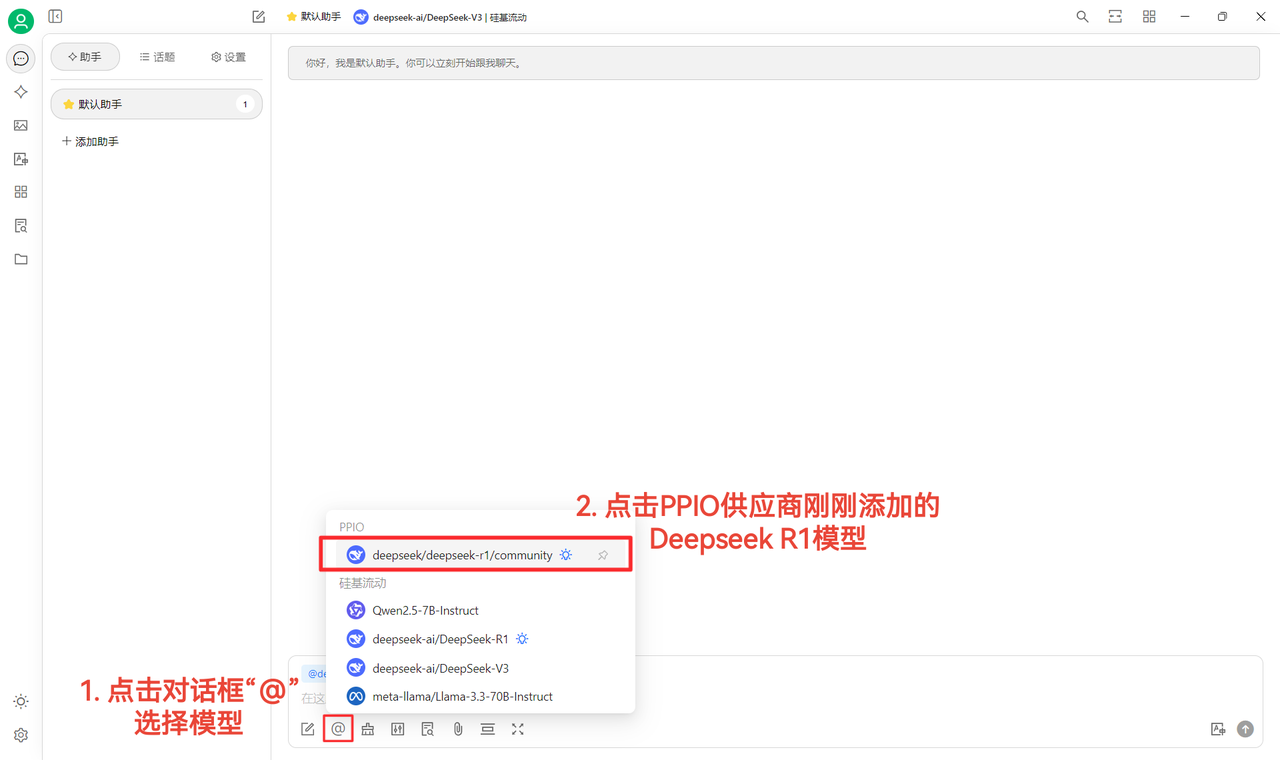
(4)选择模型:deepseek/deepseek-r1/community 为例,如需更换其他模型,可直接更换。
DeepSeek R1 和 V3 community 版本仅供大家尝鲜,也是全参数满血版模型,稳定性和效果无差异,如需大量调用则须 **充值并切换到非 community 版本**。
### [](https://ppinfra.com/docs/third-party/cherry-studio-use#2-%E6%A8%A1%E5%9E%8B%E4%BD%BF%E7%94%A8%E9%85%8D%E7%BD%AE)2. 模型使用配置
(1)点击【检查】显示连接成功后即可正常使用
(2)最后点击【@】选择 PPIO 供应商下刚刚添加的 DeepSeek R1 模型,即可成功开始聊天\~
【部分素材来源:[ 陈恩 ](https://www.kdocs.cn/l/ctGiF5K6PQoO)】
### [](https://ppinfra.com/docs/third-party/cherry-studio-use#3-ppio%C3%97cherry-studio-%E8%A7%86%E9%A2%91%E4%BD%BF%E7%94%A8%E6%95%99%E7%A8%8B)3. PPIO×Cherry Studio 视频使用教程
若您更倾向直观学习,我们在 B 站准备了视频教程。通过手把手教学,助您快速掌握「PPIO API+Cherry Studio」的配置方法,点击下方链接直达视频,开启流畅开发体验 → [《 【还在为 DeepSeek 疯狂转圈抓狂?】派欧云+DeepSeek 满血版 =?不再拥堵,即刻起飞》](https://www.bilibili.com/video/BV1BZNmeTEwg/?buvid=XX82F37818653072D274A6BB8A4FE7938A30C\&from_spmid=search.search-result.0.0\&is_story_h5=false\&mid=3CpKQv%2Bjnb8k6iTGlUl1eH8FTQ%2FSZMtL1rElX6M3iMo%3D\&plat_id=116\&share_from=ugc\&share_medium=android\&share_plat=android\&share_session_id=b892268f-5751-4f6e-9690-50b37855d346\&share_source=WEIXIN\&share_source=weixin\&share_tag=s_i\&spmid=united.player-video-detail.0.0\×tamp=1739160448\&unique_k=eKDZuRP\&up_id=3546757841554023\&vd_source=50fea165795ccc47455a165f5bcaeed2)
【视频素材来源:sola】
---
# Agent Instructions: Querying This Documentation
If you need additional information that is not directly available in this page, you can query the documentation dynamically by asking a question.
Perform an HTTP GET request on the current page URL with the `ask` query parameter:
```
GET https://docs.cherry-ai.com/pre-basic/providers/ppio.md?ask=
```
The question should be specific, self-contained, and written in natural language.
The response will contain a direct answer to the question and relevant excerpts and sources from the documentation.
Use this mechanism when the answer is not explicitly present in the current page, you need clarification or additional context, or you want to retrieve related documentation sections.